Quickstart
sequenceDiagram
  actor You
  participant SL as superlite
  participant Agents
  You->>SL: Say what you want
  SL->>You: Pick a mode and who orchestrates
  You->>SL: Answer one batch of questions
  SL->>You: Review plan
  Note over You,SL: You decide: reply approve
  You->>SL: Approve
  SL->>Agents: Build in parallel, review, fix
  Agents-->>SL: Tested work
  SL->>You: Report with time and cost
How it works
Section titled “How it works”You give superlite a request. It turns the request into a plan, waits for your yes, and then does the work without asking again. The plan is the one place where you steer. After you approve it, scope changes are recorded as rulings and listed at the end.
Nothing is committed during the run. superlite keeps each finished task as a hidden checkpoint and asks you once, at the end, what to do with the files. What each word means is on Concepts.
You need Claude Code, git, Python 3.12 or newer and bash (Git Bash on Windows). The project you build can use any language.
-
Install the plugin in Claude Code.
/plugin marketplace add iha2/superlite/plugin install superlite@superlite-devOther tools are on Install.
-
Open a fresh session in your project. The intro screen appears once.
/superlite:introshows it again. -
Check the install. Send this message:
Let's make a react todo listA working install starts
inventingbefore any code is written. -
Pick a mode and who orchestrates. For a first run, choose Regular and the human orchestrator, so you see the plan before anything is built.
-
Answer the questions, then read the review plan and reply in your own words. Any clear yes counts.
-
Wait for the build, then read the report and run
/superlite:finish. The example below walks through each of these steps.
Example: building this docs site
Section titled “Example: building this docs site”This site was built with superlite, in the Regular flow with the human orchestrator. Here is that run, one screen at a time.
-
You ask, then answer one menu.
Claude Code · superlite ❯ Build a documentation site for superlite, laid out like Warp's docs.Mode› 1. Regular size it, plan, build, review2. Feature change existing code, prove it on a prototype3. MVP smallest working version firstOrchestrator› 1. Human you approve a plan before anything is built2. AI hands off/superlite:startrunssuperlite-cli suggest_flowon your words and the project, then asks both open questions in one menu, so you are interrupted once. You decide: the mode and who orchestrates. This run took Regular and Human. -
superlite shows the path and opens your workspace.
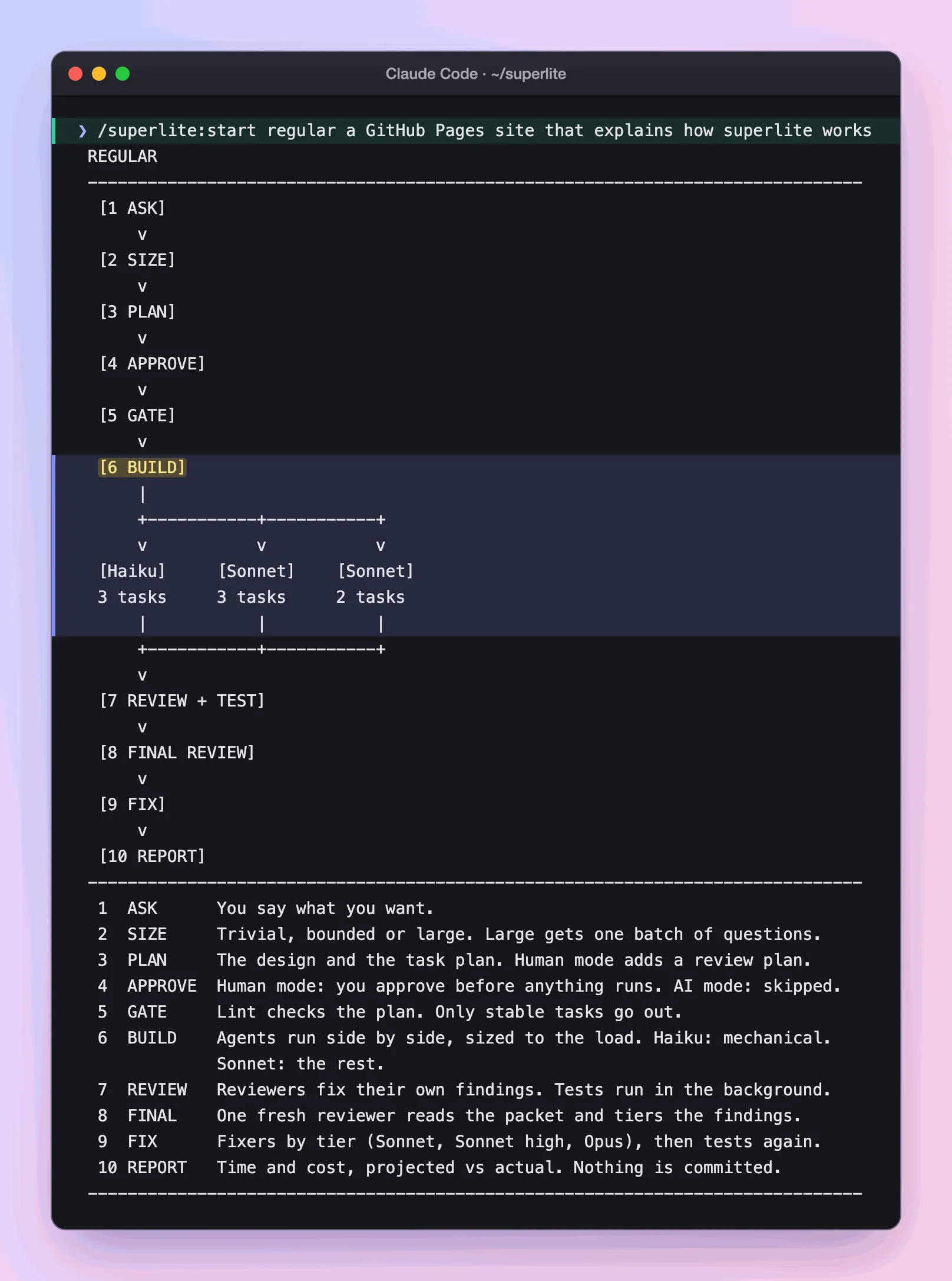
Real output: the flow screen superlite prints when the run starts.
Directory.claude/worktrees/
Directorysessions-docs-site/ branch superlite/sessions/docs-site
- …
A session opened, here as a worktree: a second folder on its own branch, so a second chat cannot overwrite this one. The request is large, so you get one batch of up to four questions. You answer once.
-
You read the review plan.
docs/plans/2026-11-12-docs-site.review.md # superlite docs site: review plan## Decisions you can change- Where the site lives: its own `site` branch (default) | a separate repo `iha2/superlite-docs`.- Page length: about 300 words of prose per guide page (default) | stricter, 200.Claude Code docs/plans/2026-11-12-docs-site.review.mdReply approve to start, or tell me what to change.The plan is plain language for you. A second file,
docs/plans/2026-11-12-docs-site.md, is the task list for the agents. superlite stops here: nothing is linted or sent to an agent until you answer. See Plan and approval. -
You approve. You decide: a clear yes is enough.
Claude Code ❯ looks good, go aheadNow lint reads the machine plan, 12 tasks, and saves a forecast: 6.8 minutes and $1.83 of agent cost. The forecast is fixed at this moment, so the report can later show where the run missed it.
-
Agents build side by side. Run
/superlite:status, or watch the ledger..superlite/progress.md - tests fast passed=45 failed=2 skipped=0 seconds=1.4- tests fast passed=47 failed=0 skipped=0 seconds=1.4- tests fast passed=103 failed=0 skipped=0 seconds=0.8flowchart LR A["Wave 1: research, skeleton"] --> B["Wave 2: page writers"] B --> C["Wave 3: publish"]
A task starts when the tasks it needs are done, so the writers waited for the fact sheets. Up to six agents ran at once, and the ledger shows tests going red, then green. See Parallel build.
-
You read the report.
Claude Code · build report Projected Actualwall-clock (min) 6.8 6.3agent cost (USD, +rework) 1.83 2.66agents 12 19quality: tests 36 passed, 0 failedIt ran 7% faster than forecast, cost 45% more, and used 19 agents against 12 forecast, because the count includes reviewers and one rework dispatch. The coordinator, your own chat, cost $6.81 on top. Nothing is committed yet. See Report.
-
You ship it. You decide:
/superlite:finishruns the tests, then asks what to do with the work.Claude Code ❯ /superlite:finish1. Merge locally into the base branch› 2. Push and open a pull request3. Keep the branch as isNothing is pushed without your yes. This run opened a pull request.
On GitHub the pull request carries a summary written from the plan.
What you end up with: the branch superlite/sessions/docs-site, PR #58 merged into the site branch, and the plan and report in docs/plans/. What is left for you: take the review comments (Copilot’s were applied in a follow-up commit), run /superlite:merged after a merge to clean up, and switch on GitHub Pages once (Settings, Pages, Source: GitHub Actions).
Good to know
Section titled “Good to know”- Plain words work as well as commands. The commands are shortcuts: see Commands.
- Each run opens a session, a branch of its own, so two chats do not overwrite each other. See Sessions.
- Say “I am away, decide yourself” and the AI orchestrator takes over: no review plan, no questions. See Orchestrators.
Concepts maps the vocabulary. Pick a flow shows which mode fits a request. The report page explains the numbers at the end.