Finish, report and history
flowchart LR
  F["finish"] --> R["Rulings I made, with cost"]
  F --> S["Report summary"]
  F --> A[".superlite/runs/id"]
  F --> H["history write: ~/.superlite/history.jsonl"]
  S --> Q{"Shipping: you decide"}
  Q --> M["Merge"]
  Q --> P["Push and PR"]
  Q --> K["Keep branch"]
How it works
Section titled “How it works”superlite-cli finish --plan PLAN closes the run. It moves the run’s files into .superlite/runs/<id>/, lists the rulings, and prints a short report summary. In human mode it also prints the approval time. For example, the docs site run wrote 2026-11-12-docs-site.report.md and .report.json next to its two plans.
Directorydocs/plans/
- 2026-11-12-docs-site.review.md
- 2026-11-12-docs-site.md
- 2026-11-12-docs-site.report.md full report
- 2026-11-12-docs-site.report.json same data, for tools
Directory.superlite/runs/ archive of each finished run, never committed
- …
Three things feed the report. Lint saves a forecast before the first dispatch, so the projection is fixed and cannot drift toward the result. Hooks capture each agent’s tokens, cost and time into .superlite/metrics.jsonl. Then superlite-cli history write appends the run’s rows to ~/.superlite/history.jsonl, which the next run uses for its predictions.
Example: reading the docs site report, line by line
Section titled “Example: reading the docs site report, line by line”-
You see the summary. When the tests are green,
finishprints your rulings and the top of the report, before any shipping question.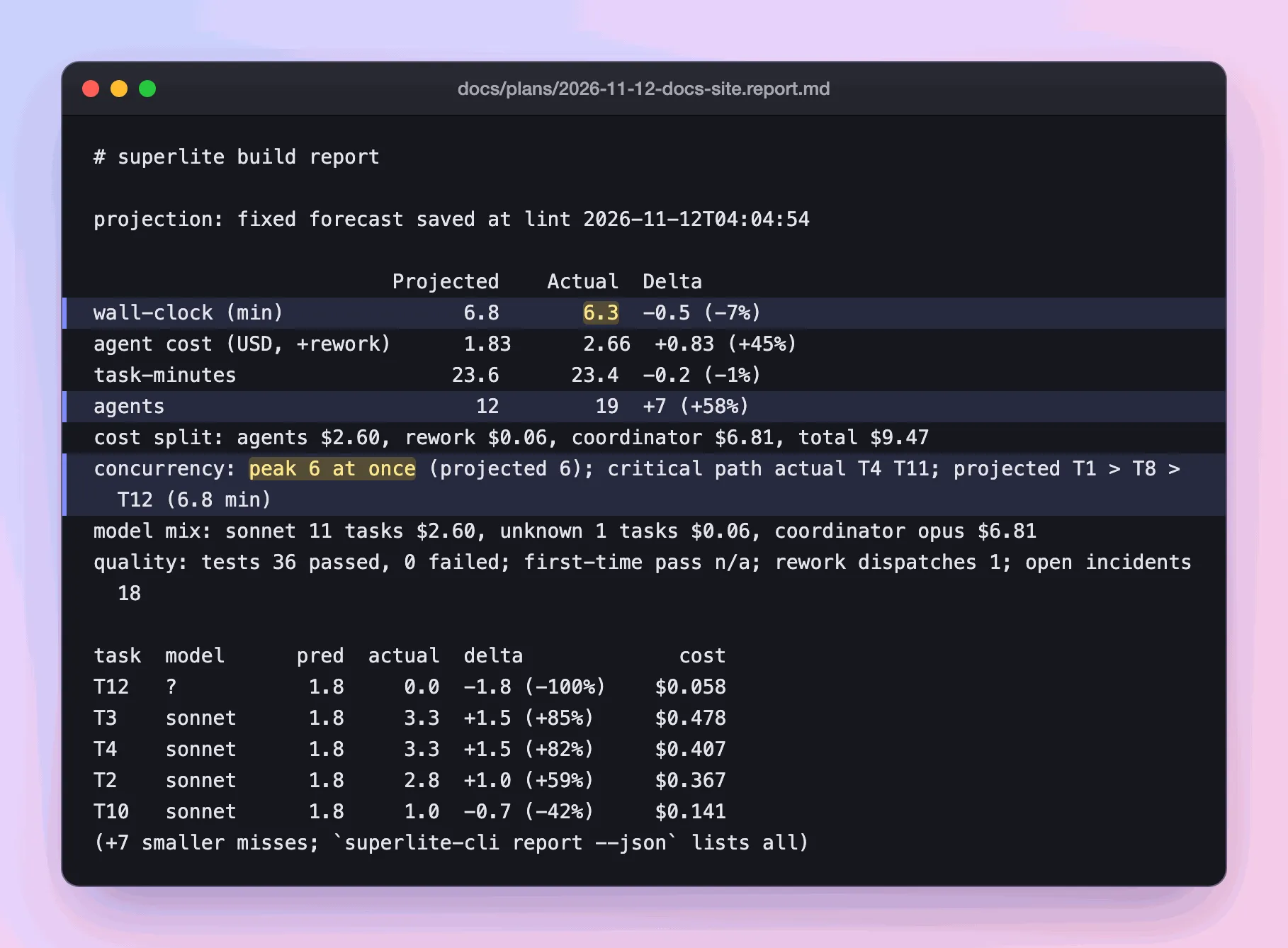
Real output: the report summary
finishprints.The forecast was saved at lint, before the first dispatch, so it cannot drift toward the result. Run
/superlite:reportto list reports, newest first./superlite:report <plan>shows the summary, and/superlite:report <plan> fullshows everything. -
You read time and agents.
docs/plans/2026-11-12-docs-site.report.md Projected Actual Deltawall-clock (min) 6.8 6.3 -0.5 (-7%)task-minutes 23.6 23.4 -0.2 (-1%)agents 12 19 +7 (+58%)Wall-clock is the minutes on the clock. Task-minutes add up each task’s own time, so it is far above wall-clock when agents work side by side. The report counts every agent that ran, not only the twelve planned, so 7 more ran than forecast.
-
You read the cost. This is where the surprise is.
docs/plans/2026-11-12-docs-site.report.md agent cost (USD, +rework) 1.83 2.66 +0.83 (+45%)cost split: agents $2.60, rework $0.06, coordinator $6.81, total $9.47The forecast covers agents only, and they ran 45% over. The coordinator, Opus planning and dispatching, cost $6.81 of the $9.47 total. That is why the cost split is shown: the part you can predict is not the biggest part.
-
You read how parallel it was.
docs/plans/2026-11-12-docs-site.report.md concurrency: peak 6 at once (projected 6); critical path actual T4 T11; projected T1 > T8 > T12 (6.8 min)The critical path is the longest chain of waiting tasks, and it sets the minimum time. It moved from the forecast’s T1 > T8 > T12 to T4 > T11 because the reference facts (T4) ran 82% over their estimate. See parallel build.
-
You read quality.
docs/plans/2026-11-12-docs-site.report.md quality: tests 36 passed, 0 failed; first-time pass n/a; rework dispatches 1; open incidents 18First-time pass counts tasks that passed with no rework. It says n/a here because the run measured none. A rework dispatch is a fix round. Open incidents are logged problems, such as the failing test runs the reviews page shows.
-
You read the takeaway, then decide.
docs/plans/2026-11-12-docs-site.report.md takeaway: ran 7% faster than projected; cost 45% over; biggest miss T12The takeaway is the report in one sentence. T12’s miss is a gap in measurement: it shows 0.0 actual minutes and model
?, so it looks untimed.history writehas by now appended this run’s rows to~/.superlite/history.jsonl, which sharpens the next forecast. Nowsuperlite:shippingasks how to ship. You decide: commit, merge, push and open a PR, or keep the branch.
What you end up with: a report in docs/plans/, a history row for the next forecast, and the shipping choice in your hands. This run ended in PR #58.
Other lines in the report:
| Line | What it tells you |
|---|---|
| model mix | Tasks and cost per model. Here Sonnet had 11 tasks. |
| task table | The biggest misses between predicted and actual minutes, with cost. |
cost source: est |
In the full report: the cost is estimated from tokens. |
Good to know
Section titled “Good to know”- The report summary prints before any merge or PR option, so you see the cost before you decide.
- Feature runs add a part for the prototype and integration, with the prototype’s share against a 25% cap.
- Your rulings are the decisions you did not make yourself. Each shows its cost if wrong, and scope changes also appear under “Changed from the approved plan”.
After the report, superlite:shipping first asks once whether to commit the finished work to the session branch or leave it uncommitted. It then verifies and asks how to ship: merge locally, push and open a PR, or keep the branch. It never pushes or merges without your answer. Unattended runs keep the branch and do not push, merge or commit. After a PR merges, run /superlite:merged. See the session lifecycle.
Back to human or AI orchestrator, or see how a run starts.